


AdventHealth
3.92.59K Reviews
App Specs
- Version
- 5.6.6
- Updated On
- License
- Free
- Downloads
- 500,000+
- Developer
- AdventHealth
- Categories
- Medical
- Platform
- Android, iOS
Screenshots
 Analysis by AppCompare
When health details are scattered across appointment cards, messages and a patient portal, even a routine checkup can take more effort than it should. I see AdventHealth as a practical way to bring parts of that routine together, especially for people who already receive care through AdventHealth. It is a medical app from AdventHealth, and its appeal is less about replacing a clinician than about making everyday contact with care easier to manage.
What the app is useful for today
The app’s current version is 5.6.6, and the product has been available since June 28, 2019. That history suggests an established service rather than a brand-new experiment, but a version number alone does not tell me which features changed or how they behave on every device. I would judge it by whether its practical tasks—keeping track of care, finding records and contacting a provider—fit into my own routine.
AdventHealth is free, rated for Everyone, and has an average rating of 3.4 from around 6,200 ratings. Those figures give useful context, not a guarantee of a smooth experience for every patient: healthcare apps can depend on how an organization’s services and a person’s care are set up. I’d install it with a specific need in mind, rather than expecting it to solve every health-management problem at once.
Where it fits among medical apps
Unlike a general wellness tracker, a hospital or health-system app is most useful when its tools connect with the care a person actually receives. AdventHealth’s strongest potential is that connection: appointments, medical records, test results and communication can live alongside one another instead of being split between a calendar, phone calls and separate notes. For someone already using AdventHealth services, that can make routine administration feel less fragmented.
That focus is also a boundary. If you mainly want broad fitness coaching, a dedicated activity app may be a better fit; if your providers are outside AdventHealth, a general health record tool or their own patient portal may serve you better. I would not choose this app just because I want a symptom search or step counter. Its value depends on whether its care-related tools match my real provider relationship.
A sensible way to judge the experience
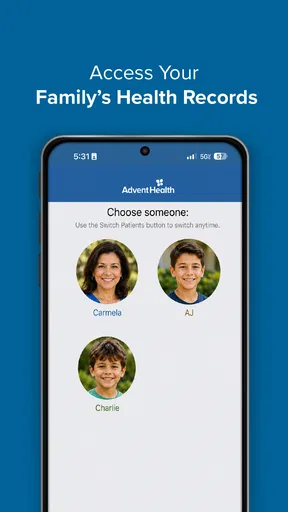
Before relying on any patient app, I’d check whether I can sign in successfully and see the parts of my care I need. If a family member helps manage appointments, I’d also work out who should keep reminders and records, rather than assuming one account automatically covers another person. For a shared household, a simple calendar can still be useful alongside the app, particularly when several people have different appointments.
I’d treat medical information in the app as a convenience for reviewing care, not as a substitute for asking a clinician to explain an unclear result. Likewise, a symptom tool can help organize questions, but it should not decide whether a serious or rapidly worsening problem needs urgent attention. The app can support a conversation; it cannot examine someone or make a diagnosis.
Worth Reading Before You Choose

EA SPORTS FC Mobile 26 Is a Bigger Football Game, but It Takes Time

Flipboard Shows What News Apps Must Do Beyond the Feed

Switching to Android Auto Means Rethinking Your Driving Routine

Google Calendar Makes a Crowded Week Easier to Manage

Ludo King Makes the Most of the Minutes Between Plans

Baby Panda World Brings Quick Play to Modern Phones, but Its Game Library Feels Busy
Getting Started with AdventHealth
First things first, downloading AdventHealth is a breeze. Available on both Android and iOS, you just hit the download link and boom, you’re ready to start organizing your health life. Once installed, the setup process is pretty intuitive. You’ll need to create an account, but it’s a straightforward process, and within minutes, you’re in.
The User Interface
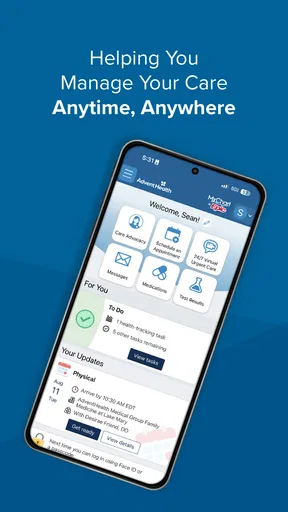
Now, let’s talk about the user interface. It’s clean, with a modern design that’s easy on the eyes. Navigation is simple, thanks to well-designed menus. You'll find your way around without any trouble, and everything feels just a tap away. I really appreciated the dashboard layout; it gives you a quick snapshot of your health info, upcoming appointments, and any alerts you should be aware of.
Key Features
One of the standout features has to be the appointment scheduling. I mean, who enjoys calling up to book a doctor’s appointment these days? With AdventHealth, you can schedule, reschedule, and even cancel appointments directly through the app. Plus, it sends you reminders so you never miss an appointment again.
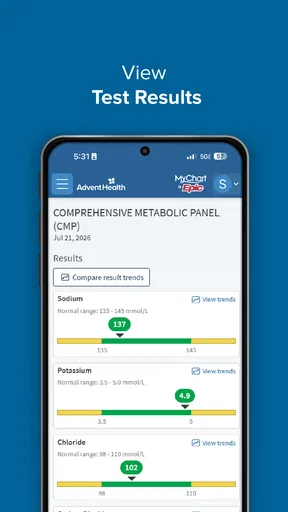
Another impressive feature is the integration with your health records. The app allows you to access your medical history at the tap of a button. This means less time spent filling out forms and more time focusing on what really matters—your health. You can also view test results directly in the app, which is a game-changer for those who like to stay informed.
Making appointments and records work harder
A useful habit is to check the appointment details before leaving home, then use the app’s reminder as a prompt to prepare rather than as the only place you keep the time. I’d note questions as they occur and bring them to the visit, especially if a result or medication change needs clarification. That turns a quick glance at the record into a more productive conversation instead of trying to remember everything in the exam room.
Records are most valuable when they help you answer a concrete question: what was discussed last time, which result should I ask about, or what information might I need at a follow-up? If something seems incomplete or confusing, I’d contact the care team rather than treating the screen as a complete explanation. A patient portal can make information easier to reach, but it does not remove the need for context.
There is also a practical trade-off in having more health information close at hand. It can reduce the effort of keeping track, but checking results repeatedly may create worry without adding understanding. I’d use the app to prepare for a discussion and follow the clinician’s guidance about when and how to review results, not refresh it as a substitute for that discussion.
Personal Health Management
The app doesn’t stop at just managing appointments and records. It also offers a range of tools to help you manage your health more broadly. There’s a symptom checker, which is super handy for those “should I see a doctor or not?” moments. Plus, you can track your medications, which is especially useful if you’re juggling multiple prescriptions.
Want to get more active? AdventHealth has you covered with its fitness tracking capabilities. Sync it with your wearable devices and keep tabs on your steps, workouts, and overall activity levels. It’s like having a fitness coach in your pocket.
When tracking helps—and when it does not
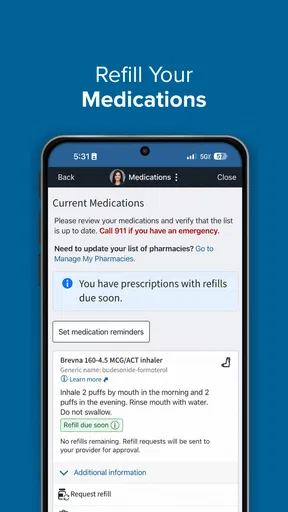
For medication tracking, I’d make the app part of a routine I already follow: review the list when preparing for a visit, and compare it with what I actually take. That is especially helpful if prescriptions have changed, because an old entry can be more confusing than no list at all. I would still use the instructions from the prescribing clinician or pharmacist for dosing; a tracking feature is a memory aid, not permission to change treatment.
Activity tracking makes more sense as a rough picture of habits than as a medical measurement. If I already use a wearable, connecting activity information may keep everyday movement in view without opening another app. But anyone who needs specialized training plans, detailed performance analysis or a particular device ecosystem may be better served by a fitness-focused alternative. The health-system connection is the reason to choose this app, not necessarily its depth as a sports tool.
The symptom checker is best approached as a way to put concerns into words and decide what to ask next. I would not use it to rule out a condition or delay urgent care. For a mild, familiar concern, it may help structure a call or appointment; for severe symptoms or a sudden change, contacting appropriate medical help is the safer choice.
Patient Support and Communication
Communication with your healthcare provider is seamless with this app. You can send messages directly to your doctor’s office, which is great for quick questions or follow-ups. No more waiting on hold for a simple inquiry! The app also provides access to patient education materials, so you can stay informed about your health conditions and treatments.
Everyday use, privacy and practical limits
Picture a weekday morning when you realize a follow-up is due and cannot remember whether you need to move an appointment or ask about a test result. Rather than searching through old texts and calling without the relevant details, you can check the appointment and record information, then send a concise message if the issue is appropriate for the office. That kind of small, repeated task is where a patient app can save effort: not by making care automatic, but by making the next step clearer.
Messages are convenient for non-urgent matters, but I would not assume they are monitored like an emergency line or expect an instant reply. If the issue needs a quick answer, a phone call may be more suitable; if it is an emergency, use emergency services. The better channel depends on urgency, and a familiar messaging screen should not blur that distinction.
Because this is a medical app, I’d also be deliberate about using it on a device I can secure with a passcode and keeping account access private. I would avoid sharing login details casually, especially if the phone is used by other people. That is sensible practice for any place where personal health information may appear, not a claim about a particular app policy.
One remaining limitation is that a health-system app cannot make every part of care equally convenient. A clinician’s availability, the kind of appointment needed and the information connected to an account can all shape what a patient can accomplish digitally. If a task is missing or does not work as expected, the office remains the right place to clarify the next step rather than repeatedly retrying the same screen.
Who should choose it, and what to watch
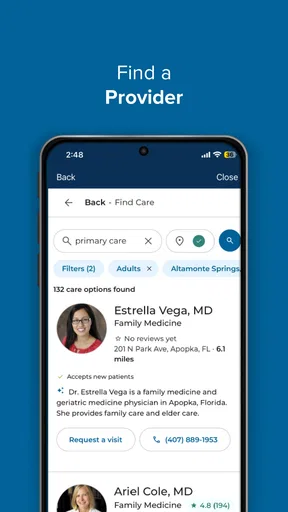
I’d recommend AdventHealth first to patients who already use AdventHealth care and want one place to handle common administrative tasks. It is less compelling for someone whose doctors belong to unrelated systems, who needs a comprehensive cross-provider record, or who wants a dedicated fitness platform. Before making it central to a routine, I’d confirm that the account shows the relevant appointments and records and that the communication options suit the kinds of questions I usually have.
AdventHealth has over 500,000 installs, which shows that many people have tried it, while its 3.4 average rating reminds me that reach and satisfaction are not the same thing. I would pay attention to whether the current version works reliably on my phone and whether the parts I need are easy to reach. Product changes may improve or alter that experience over time, but the version number by itself is not evidence of a specific improvement.
The Wrap-Up
So, what’s the verdict? Well, AdventHealth is an incredibly useful app for anyone looking to streamline their healthcare management. It’s packed with features that make managing your health more convenient and less stressful. Whether it’s scheduling appointments, accessing medical records, or communicating with healthcare providers, this app does it all with ease.
If you’re ready to take control of your health with a tool that’s as capable as it is user-friendly, give AdventHealth a try. It’s like having your own personal health assistant, always at the ready to help you live your healthiest life.
Pros
- User-friendly interface for easy navigation.
- Comprehensive health tracking features.
- Seamless appointment scheduling.
- Access to personalized health records.
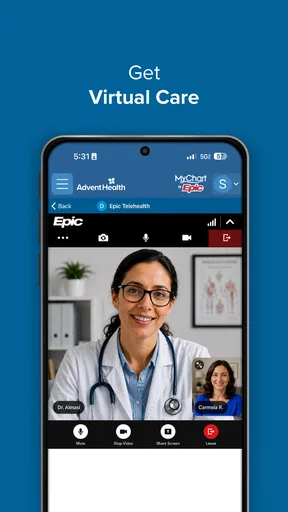
- 24/7 virtual care availability.
Cons
- Limited support for non-English speakers.
- Occasional app crashes reported by users.
- Requires strong internet connection.
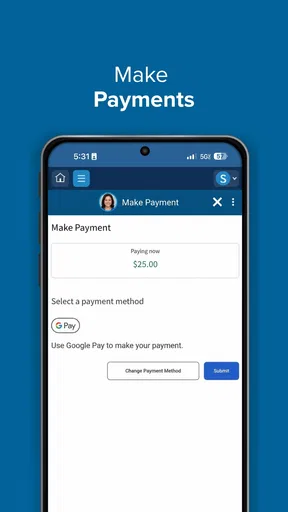
- Some features hidden behind paywalls.
- Notifications can be overwhelming.
FAQs for AdventHealth
What features does the AdventHealth app offer?
The AdventHealth app provides a range of features designed to enhance your healthcare experience. Users can schedule appointments, access medical records, communicate with healthcare providers, and receive personalized health insights. Additionally, the app offers a symptom checker and a way to manage prescriptions, making it a comprehensive tool for managing your health.
How user-friendly is the AdventHealth app for new users?
The AdventHealth app is designed with user-friendliness in mind, featuring a clean and intuitive interface. New users can easily navigate through its functions, with clear instructions and a supportive onboarding process. The app also includes a help section and customer support to assist users in making the most of its features.
Is my personal health information secure with the AdventHealth app?
Yes, the AdventHealth app prioritizes the security of your personal health information. It employs advanced encryption and security protocols to protect your data. The app complies with HIPAA regulations, ensuring that your medical information is safe and only accessible by authorized personnel.
Can I use the AdventHealth app to communicate with my healthcare provider?
Absolutely, the AdventHealth app enables direct communication with your healthcare provider. Users can send messages, request prescription refills, and even participate in virtual appointments. This feature enhances the convenience of managing your healthcare without the need for in-person visits, especially for routine check-ups or inquiries.
Does the AdventHealth app support integration with wearable devices?
Yes, the AdventHealth app supports integration with various wearable devices, allowing users to sync health data such as steps, heart rate, and sleep patterns. This integration helps provide a more comprehensive view of your health, enabling personalized recommendations and insights based on real-time data collected from your wearables.


